Resources

Free tools, plain-English guides and real case studies. No jargon, no sales pitch, real numbers.

Free tools

Interactive tools that give you a real answer in under a minute, built on the same work we do for clients.

Domain Checker

Who holds a domain, when it expires, and whether it is actually in use. Enter a business name and see which versions are yours, free, or held by someone else.

Check a domain

DNS & Email Configuration Analyser

SPF, DKIM, DMARC, DNSSEC and more, graded in plain English, with the exact records to paste in to fix what's wrong.

Analyse your DNS

Email Blacklist Monitor

Is your business email being silently blocked? Check your sending reputation against the major blocklists, and get alerted the day you get listed.

Check your reputation

SSL & Domain Expiry Monitor

Two dates can take your site and email offline. Check both instantly, then get free alerts at 30, 14, 7, 3 and 1 day(s) before either expires.

Check your dates

Email Security Checker

Can criminals send email that looks like it comes from your business? Instant SPF, DKIM and DMARC verdicts for your domain, in plain English.

Check your domain

Cyber Insurance Readiness Check

The 12 questions insurers actually ask, your readiness score, and the gap list to fix before you apply. Nothing sent or stored.

Get your score

Password Crack-Time Checker

How long would your password survive a real attack? Runs entirely in your browser; nothing you type leaves the page.

Test a password

Website Security Checker

Scan your site for HTTPS, security headers, and email spoofing protection. Get a graded report of exactly what to fix.

Check my site

Website Speed Auditor

A real Google Lighthouse audit of your mobile speed, Core Web Vitals, SEO, and best practices, with your top fixes.

Audit my site

Website Cost Estimator

Seven quick questions, one honest price range. Built on the same numbers we use in real quotes. No email required.

Try the estimator

Coming next: a Managed IT Cost Calculator and an Essential Eight self-assessment. Tell us which to build first.

Guides & insights

Plain-English answers to the questions small businesses actually ask us, written by the person who does the work. Every guide is dated so you know it is current.

Scams and cyber security

Related: Cybersecurity services →

Microsoft 365 and email

Related: Microsoft 365 migration →
  • How long does a Microsoft 365 migration actually take?

    One to two weeks end to end for 5 to 25 people, with the cutover in a single after-hours window. What the fortnight is spent on, and what actually delays one.

    25 September 2026 · 6 min read

  • Why Shouldn't I Run My Business on a Gmail Address?

    Trust, deliverability and ownership all break at a free address. Domain email costs roughly $10 to $20 per user per month and fixes all three.

    28 August 2026 · 5 min read

  • Does Microsoft Back Up My Emails and Files?

    Mostly no. Deleted Microsoft 365 data survives 14 to 93 days, then it is gone, and Microsoft's own agreement says to back up your content yourself. What a real backup looks like.

    14 August 2026 · 5 min read

  • The 10-Step Microsoft 365 Migration Plan

    A clean migration for a 5 to 25 person business takes 1 to 2 weeks and starts from $1,200, with the cutover in a single after-hours window. The playbook we run.

    Updated August 2026 · 6 min read

Running your IT

Related: Managed IT →
  • Windows 10 Still Works. Do I Need to Upgrade?

    Yes, and the Microsoft 365 catch is the one people miss. Office feature updates end on Windows 10 in 2026, but a free year buys time.

    26 August 2026 · 6 min read

  • Windows 10 Support Has Ended. Is It Still Safe?

    Free security updates ended October 2025 and the extension closes October 2026. The risk compounds monthly; the exit plan is simpler than you think.

    24 August 2026 · 6 min read

  • Managed IT or Managed Cybersecurity: Which Do I Need?

    Most small businesses need both, sized to risk, but they are different jobs. How to tell what you need and avoid paying two vendors twice.

    22 August 2026 · 6 min read

  • How Much Should Managed IT Cost?

    Most Sydney small businesses pay $80 to $150 per user per month. What you actually get at each tier, what pushes the price up or down, and why some MSPs quote three times more than others.

    Updated August 2026 · 6 min read

  • One Vendor for IT and Web, or Two?

    For most businesses under 30 staff, one accountable vendor is the right call. When that's true, when it stops being true, and the questions to ask before you bundle.

    Updated August 2026 · 6 min read

  • Managed IT Services in Sydney

    What managed IT actually includes, how onboarding works in the first month, and our pricing in plain English. The best starting point if you're comparing providers.

    Updated 13 August 2026

Case studies

Real builds for real businesses, with the details that matter.

The Euro Prestige and Performance website

Euro Prestige and Performance

A Sydney mobile mechanic with no web presence. Two weeks later: a fast, secure website with live Google reviews and quote requests landing in the owner's inbox.

Read the case study
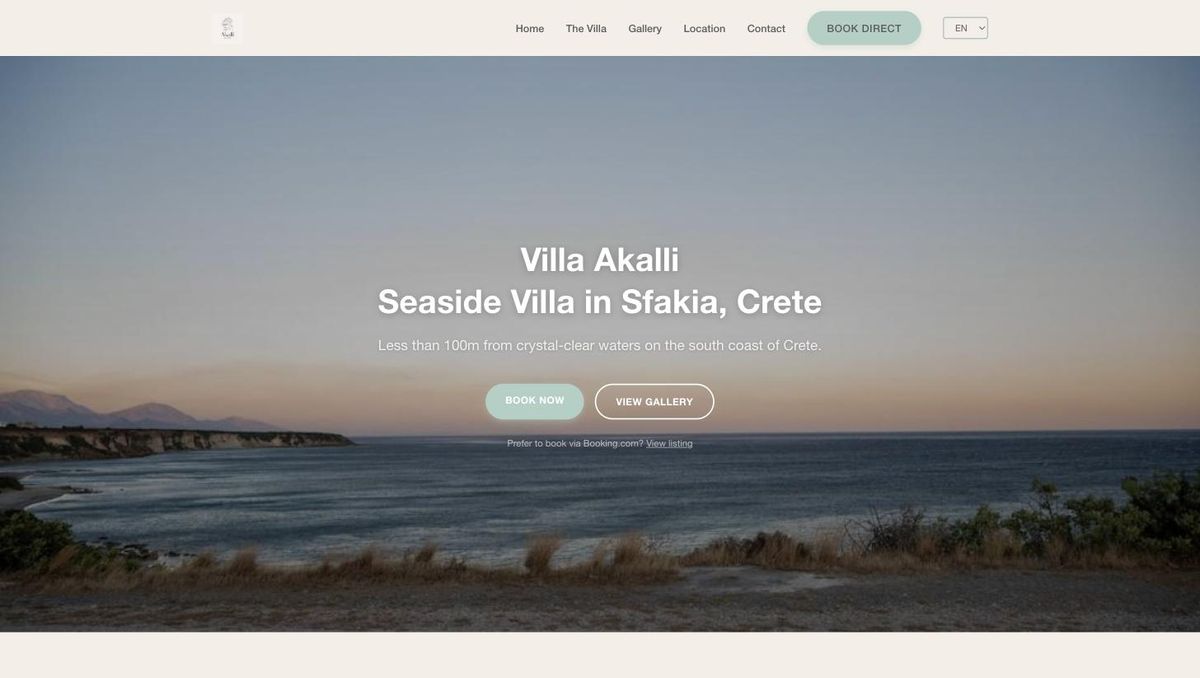
The Villa Akalli website

Villa Akalli

A seaside villa in Sfakia, Crete. A bilingual website that takes booking enquiries directly, with no platform commission in the way.

Read the case study

Can't find your question?

Ask Ari, the chat button in the corner, for a quick answer. Or tell us what you would like a guide on, and the most useful requests get written next.

Prefer to talk? Call (02) 9053 8789.